


HiroVPN: super-fast VPN
4.61.06K Reviews
App Specs
- Version
- 1.15.0
- Updated On
- License
- Free
- Downloads
- 1,000,000+
- Developer
- Wolle Development Ltd.
- Categories
- Tools
- Platform
- Android
Screenshots





 Analysis by AppCompare
For me, the most useful question about HiroVPN: super-fast VPN is not whether a VPN can sound fast or secure, but whether it fits the way I actually use my phone—and what I can reasonably expect without paying. It is a free tools app from Wolle Development Ltd., and its appeal is the promise of a simple way to route everyday internet use through a VPN. I would treat it as a convenient option to assess, not as a magic fix for every privacy, speed, or streaming problem.
What the free option tells you—and what it doesn’t
The app is free to install, while in-app purchases are listed at prices ranging from $1.49 to $39.99 per item. That gives you a clear starting point: you can try the app without an upfront purchase, but some offerings may cost extra. I would check the purchase details shown in the app before committing, especially if you are comparing a one-time option with anything recurring. The listed range alone does not tell me what each item includes, so I would not assume a particular plan unlocks a particular feature.
A promotion mentions a code that is good for one week and a speed claim above 500 Mbps. I would regard that as promotional context, not a promise about the speed I will see on my own connection. VPN performance depends on factors such as my internet service, distance to a server, network congestion, and the service I am trying to use. A code’s conditions also matter: before planning around it, I would check how it is applied and what happens when its week ends.
The app has an average rating of 4.6 from around 147,000 ratings, and it has passed one million installs. That level of uptake suggests plenty of people have tried it, but ratings cannot tell me whether a VPN’s privacy practices suit my needs or how it will perform on my particular network. HiroVPN is rated for everyone, and it was released on June 7, 2025. Its current version is 1.15.0, with Android 7.0 as the minimum operating system requirement.
Where the value of a VPN shows up in daily use
I find a VPN’s value easiest to judge in small, repeatable moments: connecting before using shared Wi-Fi, keeping a familiar route during a call, or checking whether a location change actually solves a problem. Those everyday tests matter more to me than a headline speed claim, because they reveal both convenience and friction. Next, I’d look at how HiroVPN handles the practical choices that shape those sessions.
Getting Started with HiroVPN
So, first things first, getting started with HiroVPN was a breeze. I downloaded it from the app store, and within minutes, I was ready to go. The interface is super sleek and user-friendly, making it a pleasure to use. Even if you’re not a tech wizard, you’ll find it straightforward to navigate.
One of the things that stood out to me was the quick setup process. You don’t have to jump through hoops to get it running. Just a couple of taps and bam! You’re connected to a more secure internet experience.
Worth Reading Before You Choose

EA SPORTS FC Mobile 26 Is a Bigger Football Game, but It Takes Time

Flipboard Shows What News Apps Must Do Beyond the Feed

Switching to Android Auto Means Rethinking Your Driving Routine

Google Calendar Makes a Crowded Week Easier to Manage

Ludo King Makes the Most of the Minutes Between Plans

Baby Panda World Brings Quick Play to Modern Phones, but Its Game Library Feels Busy
That low-friction start is most valuable when I need a quick connection rather than a project to configure. For example, if I am about to join public Wi-Fi at a café, I can make connecting part of the routine before opening email or a work account. A useful habit is to test the connection first with a low-stakes task, then open anything sensitive. That way, I am less likely to assume the VPN is active just because I launched the app.
Speed and Performance
Now, onto one of the most critical aspects – speed. You know how some VPNs can slow down your connection to a crawl? Not with HiroVPN. It's called "super-fast" for a reason. I ran a few speed tests while connected to different servers, and the results were impressive. Streaming, downloading, or just browsing, everything runs smooth as butter.
I tried watching some HD videos, and there were no hiccups, which is a massive win in my book. It’s perfect for those of us who love binge-watching our favorite shows without the dreaded buffering.
Still, I would not use one good speed test as a guarantee for every situation. A VPN adds another route between the phone and the site, so the closest or automatically selected connection may behave differently from a distant location chosen for a specific purpose. If a video starts buffering, I would first try a nearby server or reconnect, then compare with the VPN turned off. That simple check helps distinguish a VPN slowdown from a weak Wi-Fi signal or a problem with the streaming service.
For a traveler on hotel Wi-Fi, consistency may matter more than chasing the highest number. I would connect before signing into accounts, keep the same server while completing a task, and avoid repeatedly switching locations mid-session. Frequent changes can interrupt a call, download, or login flow even when each individual connection is fast. If stable access to a particular work system is essential, a VPN specifically managed by the employer may be a better fit than a general consumer app.
Security Features
Alright, let’s talk security. After all, that’s one of the main reasons we use a VPN, right? HiroVPN doesn’t skimp on this front. It offers top-notch encryption, which is fancy talk for keeping your data safe from prying eyes. Whether you're connecting from a coffee shop or your own home, you can browse with peace of mind.
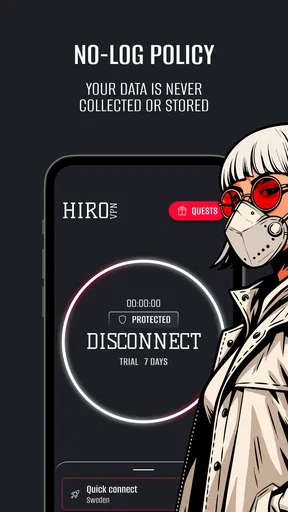
The app also includes an automatic kill switch, which sounds intense but is actually a fantastic feature. If your VPN connection drops for any reason, it cuts off your internet connection to keep your data secure. It’s like having an extra layer of armor around your online activities.
I see those protections as helpful safeguards, not a reason to share more than I normally would. A VPN can protect the connection between my device and the VPN service, but it does not make suspicious links safe, prevent every kind of tracking, or replace strong account passwords and two-factor authentication. I would still check for the VPN indicator before using a sensitive app, and I would keep software updated. If the kill switch interrupts access after a connection drop, I would reconnect deliberately rather than switching it off without understanding the trade-off.
That distinction matters most for people who handle confidential information. If my job requires a specific provider, audited controls, or a company configuration, I would use the approved service instead of assuming a general VPN is an equivalent. For ordinary browsing on shared Wi-Fi, a VPN can be a useful layer; for high-risk work, the right choice depends on requirements that a simple connection toggle cannot answer.
Global Server Access
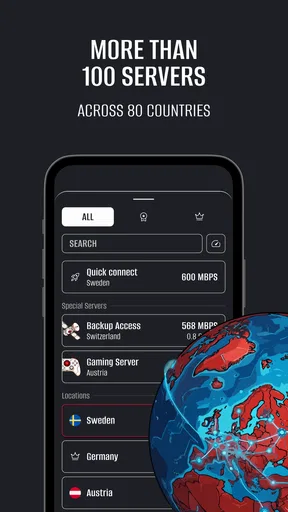
One of the coolest things about HiroVPN is its extensive server network. With servers dotted all around the globe, you can virtually transport yourself anywhere. Need to access content from another country? No problem! Just pick a server from that region, and you’re good to go.
This feature is especially handy for accessing geo-restricted content. Whether you’re trying to catch a show that’s only available overseas or accessing websites that are blocked in your region, HiroVPN has got your back.
In practice, a location choice is a trade-off: a server nearer to me may be the better choice for responsiveness, while a farther-away location may be relevant when I need an apparent connection from another region. I would not assume that changing regions will always make a streaming catalog available. Services can restrict VPN traffic or apply their own account and location rules, so I would treat access as something to test rather than a guaranteed outcome. For routine browsing, choosing a nearby option is usually the less complicated starting point.
This is also where HiroVPN differs from a browser’s private mode. Private browsing can keep some history out of the local browser session, but it does not route all device traffic through a VPN. A VPN is broader in that respect, while a browser privacy mode is simpler and does not require choosing a server. They solve different problems, so I would use the one that matches the task rather than treating them as substitutes.
User-Friendly Features
Another thing I love about HiroVPN is its simplicity. The app is designed to be intuitive, with easy-to-understand settings and options. You don’t need to be a tech genius to figure it out, which is always a plus in my book.
Plus, it offers a handy "smart connect" feature that automatically chooses the best server for you based on your location. It's perfect for those who just want to connect and go without fiddling with settings.
For a regular routine, smart connect is a sensible default: connect, check that the VPN is active, and carry on. But automatic selection is not always the right answer. If I need a particular region, or if a site behaves oddly, I would choose a location intentionally and compare the result. I would also avoid changing server locations during an active payment or login process, since a sudden network change can trigger extra security checks or interrupt the session.
A practical everyday example is checking a bank balance while waiting for a train. I would connect before opening the banking app, confirm the VPN indicator, and complete the task without hopping between servers. Once finished, I could leave the VPN on for general browsing or disconnect if a service I rely on works better without it. This small routine keeps the tool useful without turning every phone interaction into troubleshooting.
Who is likely to get value
I think this app is easiest to recommend to someone who wants a straightforward VPN for ordinary phone use, prefers trying before paying, and does not want to learn a complicated set of network controls. The free installation lowers the barrier to testing it on a commute, at a café, or while traveling. The listed in-app purchases mean I would make the decision about paid extras only after checking what is actually offered and whether it solves a problem I have.
I would be more cautious if I needed detailed privacy documentation, a work-approved connection, predictable access to a specific streaming catalog, or a guaranteed performance level. In those cases, a VPN with clearly documented policies and features that match the requirement may be a better comparison. The simplest app is not automatically the right one when the stakes or technical demands are higher.
It is also not a replacement for a good home router, mobile data security, or careful account habits. If the problem is weak Wi-Fi coverage at home, a VPN will not fix the signal. If I want to stop websites from recognizing me through account logins or browser fingerprints, a VPN alone will not do that either. Knowing what the tool can and cannot address is part of getting real value from it.
Final Thoughts
In a world where online privacy and speed are paramount, HiroVPN: super-fast VPN delivers on both fronts. It’s a robust tool for anyone looking to enhance their internet experience without sacrificing speed or security. Whether you’re streaming, browsing, or just trying to keep your data safe, HiroVPN is a reliable companion.
So, if you’re on the hunt for a dependable VPN that doesn’t complicate things, give HiroVPN a shot. It might just be the digital sidekick you’ve been looking for.
My buy-or-skip verdict is to try the free app if you want a simple VPN to evaluate in your own routine, then judge it on connection stability, the locations you need, and whether your everyday services continue to work. I would not pay for an item just because a promotion highlights a high speed figure; I would first confirm the exact purchase and test the free experience against my actual needs. If it behaves well for casual browsing and public Wi-Fi, it may offer useful convenience. If you need specialist assurances or a specific guaranteed outcome, I would choose a service built around those requirements instead.
Pros
- Offers unlimited bandwidth for browsing.
- Provides high-speed connections reliably.
- User-friendly interface
- easy to navigate.
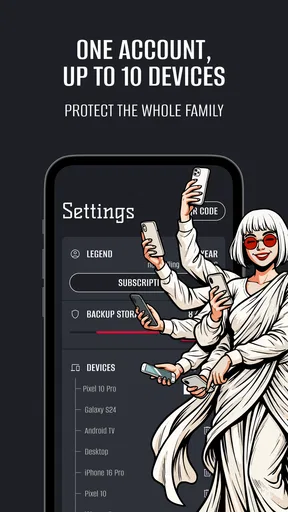
- Compatible with multiple devices and OS.
- Strong encryption ensures data privacy.
Cons
- Limited server locations available.
- Occasional connection drops reported.
- No free trial for new users.
- Customer support is only via email.
- May slow down during peak hours.
FAQs for HiroVPN: super-fast VPN
What is HiroVPN, and how does it work?
HiroVPN is a super-fast virtual private network (VPN) application designed to provide secure and private internet browsing. It works by encrypting your internet connection, allowing you to browse anonymously and access geo-restricted content. By routing your traffic through servers worldwide, HiroVPN masks your IP address, enhancing your online privacy and security.
Is HiroVPN free to use or does it require a subscription?
HiroVPN offers both free and premium subscription plans. The free version provides basic features with limited server access, while the premium subscription unlocks additional features such as faster speeds, more server locations, and enhanced security protocols. Users can choose a plan that best suits their needs and budget.
On which devices and platforms can I use HiroVPN?
HiroVPN is available for both Android and iOS devices, making it accessible to a wide range of users. You can download the app from the Google Play Store or the Apple App Store. Additionally, HiroVPN may be compatible with other platforms like Windows or macOS, enhancing its versatility for users seeking comprehensive protection across multiple devices.
How does HiroVPN ensure the privacy and security of my data?
HiroVPN uses advanced encryption technologies to secure your internet connection, ensuring that your data remains private and protected from hackers and surveillance. The app follows a strict no-logs policy, meaning it does not track or store your browsing activities, further safeguarding your privacy. Regular updates also maintain its security standards.
What should I do if I experience connectivity issues with HiroVPN?
If you experience connectivity issues with HiroVPN, try switching to a different server location within the app, as some servers may experience temporary downtime. Ensure your internet connection is stable, and consider restarting the app or your device. For persistent issues, contact HiroVPN’s customer support for assistance and troubleshooting.


